Role Templates
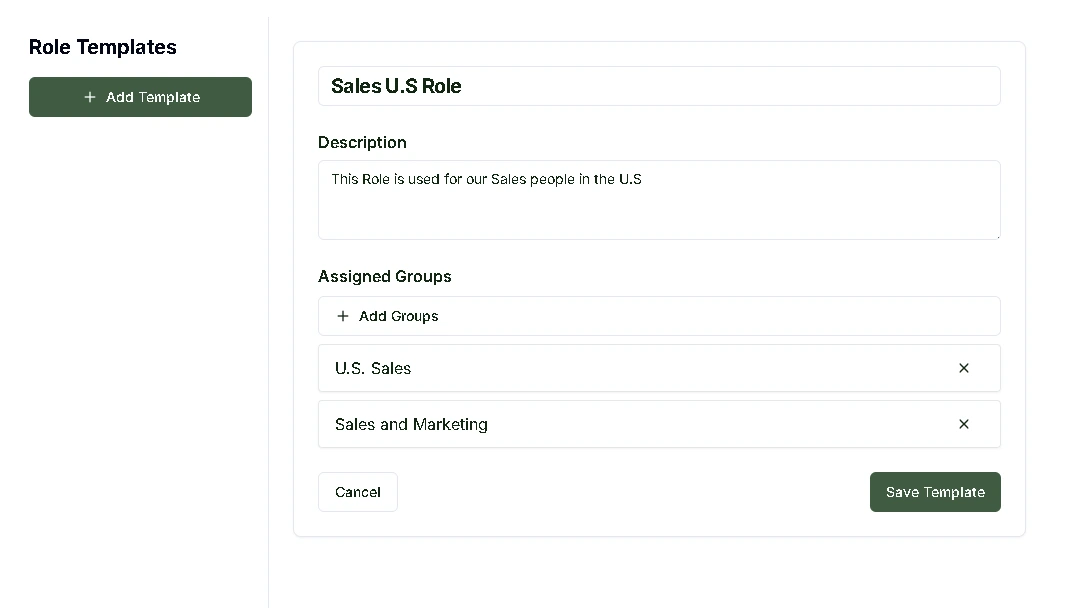
Role Templates let you define standardized access packages that get applied through Workflows. Each template bundles the Entra ID group memberships a user needs for a given role.
They work well for scenarios where Dynamic Groups aren't enough, like when you need to bundle complex access permissions that go beyond simple attribute-based rules, or when access depends on specific role assignments rather than user attributes like department or job title.
Important: Role Templates define access configurations but do not provision access immediately. Templates are only applied when activated through a Workflow.
What You Can Do
Create and edit templates Build new templates with specific group assignments, or update existing ones as access requirements change.
Enable/Disable Toggle templates on or off without deleting them. Disabled templates won't be applied by workflows until re-enabled.
Duplicate Copy an existing template as a starting point for a new one. Useful when you need variations of a similar access package.
Verify Mark a template as reviewed and approved. Verified templates show a green badge with the verifier's name and date. This is useful for compliance workflows where templates need sign-off before being used.
Assigned Groups Each template has an Assigned Groups section where you search for and add the Entra ID groups that should be granted when this template is applied.
Auto-Generated Templates
Adcyma can mine your existing Entra configuration and suggest Role Templates based on common group assignment patterns. These auto-generated templates show an "Auto" badge and indicate which attribute they were derived from and how many users matched the pattern.
You can verify auto-generated templates to mark them as reviewed, and lock them to prevent automatic syncs from changing their group assignments. Locked templates show a "Locked" badge. You can also edit and convert them into manually managed templates.
Example: IT Department New Employee Role
A "New Employee - IT Department" role template might include:
- Corporate email account and distribution lists
- IT support team and technical staff group memberships
- Access to the internal ticketing system, monitoring tools, and development environments
- VPN access and appropriate security clearance levels
When a Workflow assigns this template during onboarding, the new IT employee gets all the access they need right away.
Benefits of Role-Based Access
When you use Role Templates in your Workflows, every user with the same role gets identical access, which removes the guesswork from manual permission assignments. You also get a clear audit trail of role-based access, making compliance reviews much simpler. And since templates apply the principle of least privilege consistently, your security posture stays solid as you scale.